Documentation Index
Fetch the complete documentation index at: https://docs.zbdpay.com/llms.txt
Use this file to discover all available pages before exploring further.
In order to ensure we have everything we need to detect whether your app has not been tampered with as part of our attestation check, we require a couple of pieces of information.
Here is a handy video guide:
Android
For Android, we need your Bundle ID or package name, i.e.com.domain.appname, which you set in your Unity build settings.
This is NOT the appId ZBD provides you.
Access Google Play Console
Sign in to your Google Play Console account.
Select your app
Choose the app for which you need the SHA-256 hash.
Navigate to Release
Go to the Release section in the left-hand menu.
Navigate to Setup
Click on Setup in the submenu.
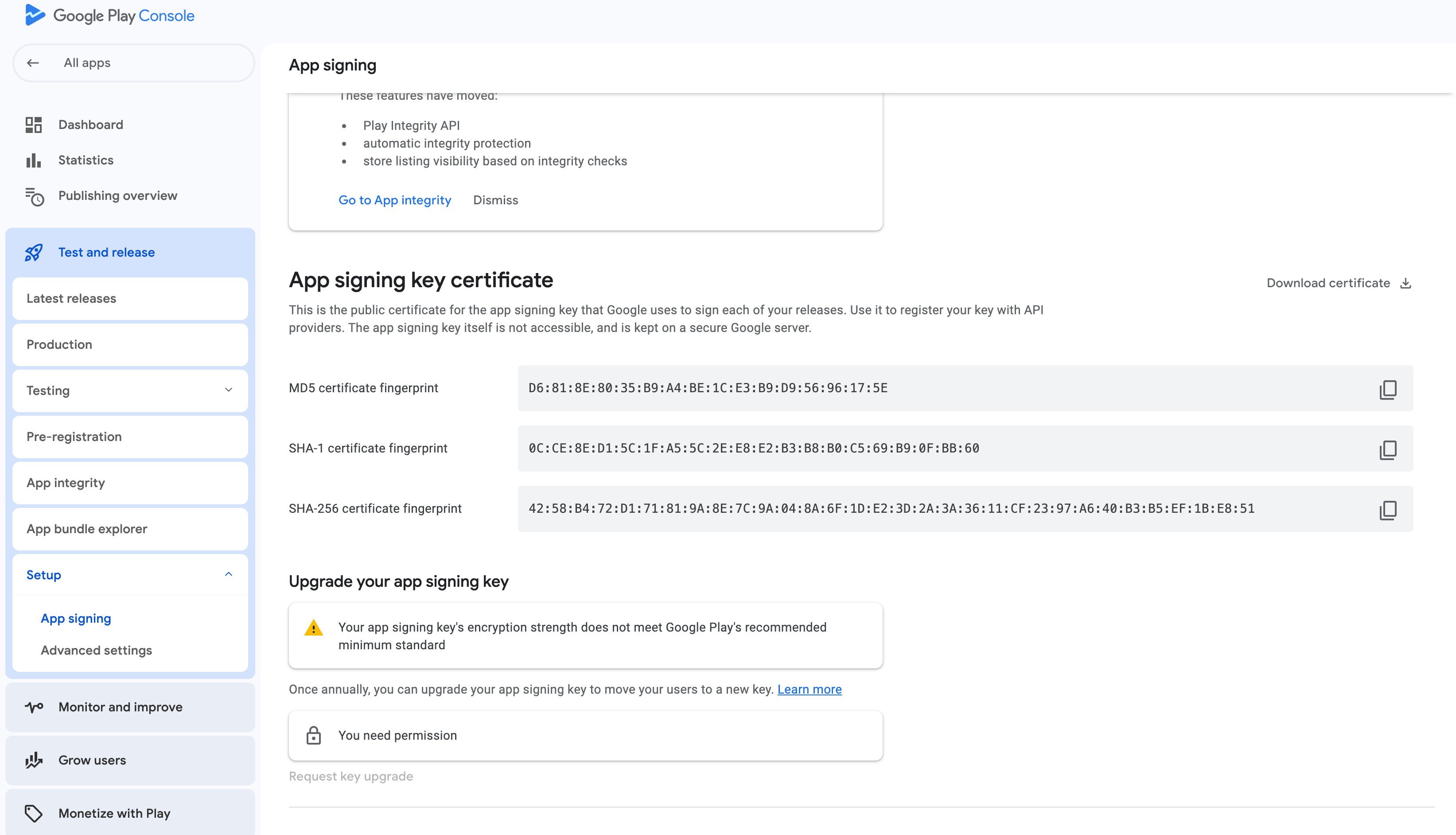
Select App integrity from the options
Find the App signing key certificate
Select and copy the SHA-256 Fingerprint
keytool -list -v -keystore path/to/your.keystore -alias your_alias -storepass your_keystore_password -keypass your_key_password
It should look something like this :
EA:A1:69:AA:2F:FC:6D:16:84:ED:06:11:E0:65:2B:E0:BB:9C:5B:E3:41:96:06:E2:3D:85:8F:2C:22:2A:E9:86
iOS
App Attest
For iOS builds, you must have App Attest enabled on your provisioning profile. The Earn SDK backend uses App Attest to validate the integrity of your game. Without it, attestation checks will fail.
To enable App Attest:
Sign in to your Apple Developer account
Navigate to Certificates, Identifiers & Profiles
Select your App ID under Identifiers
Scroll to the App Attest capability and enable it
Save your changes and regenerate your provisioning profile
Make sure to regenerate and download your provisioning profile after enabling App Attest, then update it in Xcode.
Bundle ID & Team ID
For iOS we need your Bundle ID i.e.app id, e.g.com.domain.appname and your Team ID.
To find your app’s Team ID for Apple Developer:
Access Appel Developer Account
Sign in to your Apple Developer account
Click on Membershipt details
This is NOT the appId ZBD provides you.